Keychron K3 Pro Review 2026
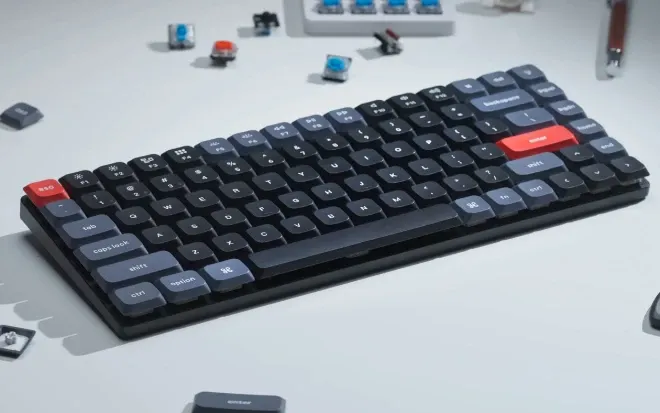
Keychron K3 Pro with Gateron low-profile Red switches: ultra-slim, QMK/VIA programmable, Bluetooth 5.1 for 3 devices, hot-swappable, PBT keycaps. The best low-profile mechanical keyboard for developers who travel.
Pros
- + $84 to $114 undercuts every comparable low-profile board
- + QMK/VIA open-source firmware for full key remapping and macros
- + Gateron low-profile Red switches feel precise and quiet
- + Bluetooth 5.1 connects 3 devices, USB-C wired at 1000Hz
- + Hot-swappable switches on RGB version, no soldering needed
- + Double-shot PBT keycaps resist shine and oil
- + Ultra-slim 22mm aluminum body, just over 800g
Cons
- - VIA setup requires wired mode, Chromium browser, and JSON upload
- - Compatible only with Gateron low-profile MX switches
- - No 2.4GHz wireless option, Bluetooth or wired only
Verdict
The best low-profile wireless mechanical keyboard on the market. QMK/VIA, hot-swap, and PBT keycaps at a price that embarrasses the competition.
Full Review: Keychron K3 Pro (Gateron Low-Profile Red, RGB)
Some peripherals blend into the background. The Keychron K3 Pro does the opposite. After months of daily use with Gateron low-profile Red switches and RGB backlighting, this keyboard has become the one piece of hardware I genuinely miss whenever I work without it. That kind of attachment to a keyboard says more than any benchmark.
This review is written from the perspective of a developer who types for hours every day, values portability, and wanted a mechanical keyboard that works seamlessly across macOS, Windows, and mobile devices without compromises.
The First Low-Profile Wireless QMK Keyboard
The K3 Pro holds a distinction that still matters: it was the first low-profile wireless mechanical keyboard with QMK support. QMK is open-source firmware used by the mechanical keyboard community to remap every key, create macros, define multiple layers, and customize behavior in ways that proprietary software from larger brands simply cannot match. The companion VIA/Keychron Launcher web app makes this accessible without compiling firmware manually.
For a developer, this is not a niche feature. Moving Delete to a more reachable position, placing media controls on the first function layer, or building a macro that types a frequently used terminal command saves real time over the course of a day. The 75% layout (84 keys) includes arrows and a function row while dropping the number pad and some modifiers, a trade-off that works well for coding and keeps the keyboard compact enough for any bag.
QMK/VIA: what it means in practice
QMK and VIA support over 1,400 keyboard models. Instead of installing one proprietary app per brand (Logitech Options, Razer Synapse, Corsair iCUE), you use a single open standard. Every key is remappable, layers are unlimited, and your configuration is stored on the keyboard itself, so it follows you to any machine. The Keychron Launcher web app provides a visual interface that makes the setup straightforward even for first-time users.
Gateron Low-Profile Red: The Silent Workhorse
The Gateron low-profile MX 2.0 Red switches are linear, meaning they travel straight down without a tactile bump or audible click. The result is a smooth, quiet keystroke that feels precise without being fatiguing during long coding sessions. Actuation force is light at 50 grams, and total travel is reduced compared to full-size mechanical switches, which is inherent to the low-profile design.
Compared to the Cherry Ultra-Low Profile switches found in some premium gaming boards, the Gateron switches feel more deliberate and better suited to sustained typing. They have slightly less travel than Razer's low-profile offerings but are stiffer, resulting in fewer accidental keypresses. The difference is subtle, but after hours of coding it adds up. The Red variant is the right choice for developers who prioritize speed and quiet over tactile feedback.
The RGB hot-swappable version allows changing switches without soldering. Pop one out, snap another in. The current ecosystem is limited to Gateron low-profile MX switches only (Red, Blue, Brown), but it means you can experiment with tactile Brown or clicky Blue without buying a new keyboard.
Build Quality and Design
The aluminum body is just 22mm tall without the adjustable feet, barely taller than a standard MX switch and keycap. Fully extended, it reaches about 35mm. At just over 800 grams, it is light enough to throw in a bag without thinking about it. The three-level adjustable feet provide ergonomic flexibility, though most developers will find the middle setting comfortable for extended sessions.
The double-shot PBT keycaps deserve specific mention. PBT plastic is harder and more resistant to shine and oil than the ABS plastic found on most keyboards in this price range. The legends are molded into the keycap rather than printed on top, so they will not fade with use. The LSA (low profile spherical-angled) profile matches the keyboard's slim design and feels natural under the fingers. The keycaps use a uniform profile across all rows, which means you can physically rearrange keys without mismatched heights, a nice detail when you remap your layout.
Connectivity: three devices, zero friction
Bluetooth 5.1 (Broadcom chip) connects to up to three devices simultaneously. Switching between a MacBook, an iPad, and a Windows desktop is a single key combination. The connection is stable and fast to reconnect after wake. USB-C wired mode delivers a 1000Hz polling rate, which matters for competitive gaming but is also a nice-to-have for developers who want the lowest possible input latency.
Battery life with RGB backlighting active lasts over a week of daily use. With the backlight off, Keychron claims up to several months. In practice, charging once a week with RGB on is realistic, and the USB-C cable you already use for everything else handles it.
macOS and Windows: Both First-Class
The K3 Pro ships with keycaps for both operating systems. A physical switch on the side toggles between macOS and Windows layouts. On Mac, the function row matches Apple keyboard behavior (brightness, Mission Control, media controls). On Windows, the same keys map to their Windows equivalents. This is one of the few mechanical keyboards where macOS support feels native rather than adapted.
Through QMK, you can maintain entirely separate keymaps for each operating system. If you switch between Mac and Windows machines during the day, the keyboard adapts with you.
RGB Backlighting
More than 22 RGB backlight presets are available, plus a static white option. Hue, saturation, brightness, and effect speed are all adjustable from the keyboard itself. The lighting is pleasant and even across the board. For developers working in dim environments, the backlight is functional rather than decorative, though the visual effects are a nice bonus if you enjoy them.
Value: The Competition Cannot Keep Up
At $84 to $114 depending on configuration, the K3 Pro undercuts every comparable keyboard on the market. Low-profile boards from Apple and Logitech start around $100 with fewer features. The Logitech MX Mechanical Mini costs $150 for the same layout, fewer programming options, no hot-swap, and no RGB. Gaming-oriented low-profile boards from Razer, Logitech, and Corsair exceed $200. The NuPhy Air75, the closest competitor with similar features, runs $130 and lacks QMK support.
In terms of hardware per dollar, nothing else comes close. The fact that Keychron also delivers open-source firmware, PBT keycaps, and tri-device Bluetooth at this price point is remarkable.
The daily driver test
The real measure of a keyboard is not how it performs in the first week. It is whether you reach for it every day months later, and whether you notice its absence. The K3 Pro passes both tests. After months of use, the Gateron Reds still feel precise, the PBT caps show no shine, and the Bluetooth switching between devices remains seamless. Every time I work on a different keyboard, I feel the difference. That is the strongest endorsement I can offer.
Minor Limitations
The VIA/Launcher initial setup requires wired mode, a Chromium-based browser, and uploading a JSON configuration file from Keychron's website. It takes about ten minutes, but it is not plug-and-play. Once configured, the settings persist on the keyboard and the web tool is no longer needed.
The physical switch for macOS/Windows mode sits close to the Bluetooth/wired/off switch on the side. They are easy to confuse by feel alone, especially in the first few weeks. No 2.4GHz wireless option is available; Bluetooth or wired are the only choices, which may matter for competitive gaming but is a non-issue for development use.
The low-profile switch ecosystem is still limited. Only Gateron low-profile MX switches are compatible with the hot-swap sockets, and QMK does not support low-profile optical switches. This is not a problem today, but it means fewer upgrade paths compared to full-size mechanical boards.
Sources and Further Reading
Official product page: Keychron K3 Pro. Keychron Launcher for QMK/VIA configuration: launcher.keychron.com. Video references: K3 Pro Backlight Effects, K3 Pro Typing Sound Test.
Published March 2026. This is an independent review and opinion piece, not a sponsored post. CodeHelper has no commercial relationship with Keychron.
Frequently Asked Questions
Is the Keychron K3 Pro good for programming?
Yes. The 75% layout includes arrows and function keys while staying compact. QMK/VIA support allows remapping every key and creating macros for terminal commands, IDE shortcuts, and custom layers. Gateron low-profile Red switches are quiet and precise for long coding sessions.
Does the Keychron K3 Pro work with Mac and Windows?
Yes. The K3 Pro ships with keycaps for both operating systems and a physical toggle switch for Mac/Windows mode. On macOS, function keys match Apple keyboard behavior natively. Through QMK, separate keymaps can be maintained for each operating system.
What switches does the Keychron K3 Pro support?
The hot-swappable RGB version supports Gateron low-profile MX mechanical switches only, available in Red (linear), Blue (clicky), and Brown (tactile). QMK does not support low-profile optical switches. The switch ecosystem is more limited than full-size mechanical keyboards.
How does the Keychron K3 Pro compare to the NuPhy Air75?
The NuPhy Air75 costs $130 and adds a 2.4GHz wireless option and a more robust case, but it lacks QMK/VIA programming support. The K3 Pro at $84 to $114 offers open-source firmware, full key remapping, and a slimmer profile. For developers who value customization, the K3 Pro is the stronger choice.
Related
CodeHelper is free and ad-free. Support the project on Ko-fi if you find it useful.